Changing Digital Banking Themes


This article describes how to change the visual theme in Digital Banking.
Please note you can only change the theme through the Desktop version.


Step 1
In your Digital Banking application, go to Tools > Settings.
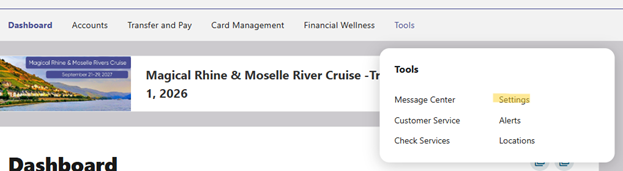
Step 1

Step 2
Click Themes. The Available section lists themes that you can select to personalize your interface for a different visual experience.
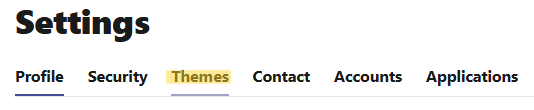
Step 2

Step 3
Click Activate next to the theme you want to apply.
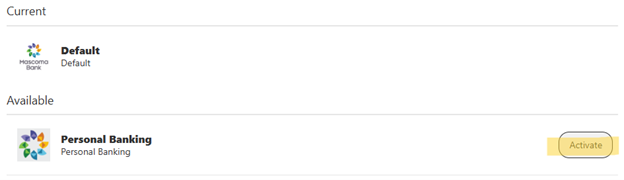
Step 3


Please reach out if you have questions or need additional assistance.
Mascoma Bank and Androscoggin Bank Officially Unite Under
ClearNorth Financial Mutual Holding Company.

Holiday Hours: The bank will be closed on Wednesday, November 11th, 2026, for the Federal Holiday.
Digital Banking and ATMs will still be available for your banking needs. Learn more

To better serve you, all branches of Mascoma Bank will be closed Saturday, October 24, 2026, for a system update. Our digital banking and ATM's will be available to serve you. We apologize for the inconvenience.